One brand's affiliates team tracked creator outreach by watching a Slack channel and reacting with emojis to show who had reached out to which creator.
Other teams find creators at events and build each relationship by hand. Some tag gifting and influencer orders in Shopify after the order is placed, to remember who they sent product to. Teams that work with many creators check each one's content to see whether it fits the brand.
Influencers Board starts from the people who have already ordered from you. It shows which of your buyers have 50,000+ followers on Instagram, TikTok, YouTube, or X, what each one ordered and spent, and where your team's outreach to each one stands.
Influencers Board shows the creators who already buy from you
Influencers Board is a page in OuterSignal that lists your customers who have 50,000+ followers on Instagram, TikTok, YouTube, or X, and tracks your team's outreach to each one. It lists buyers only. People who have not ordered from you do not appear.
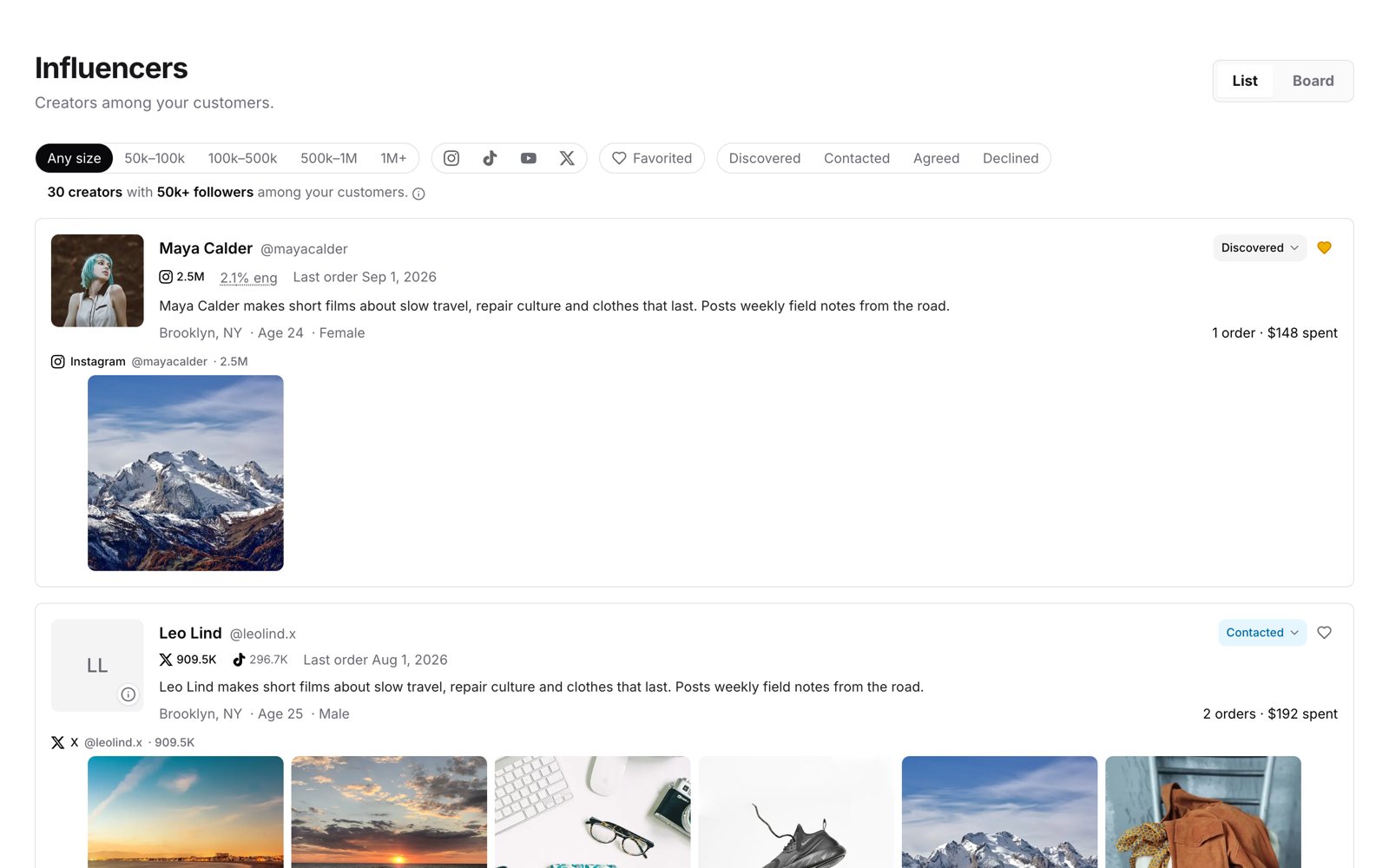
In the List, each creator's card shows their handle, status, followers per platform, engagement rate, last order date, bio, location, age, gender, orders and spend, and content from each platform. The summary line at the top counts the creators with 50k+ followers among your customers.
Every creator on the list has already ordered from you, so your team can open the conversation with what they bought.
How to find influencers among your customers
1. Open Influencers. In the left menu of OuterSignal, click Influencers. There is nothing to set up.
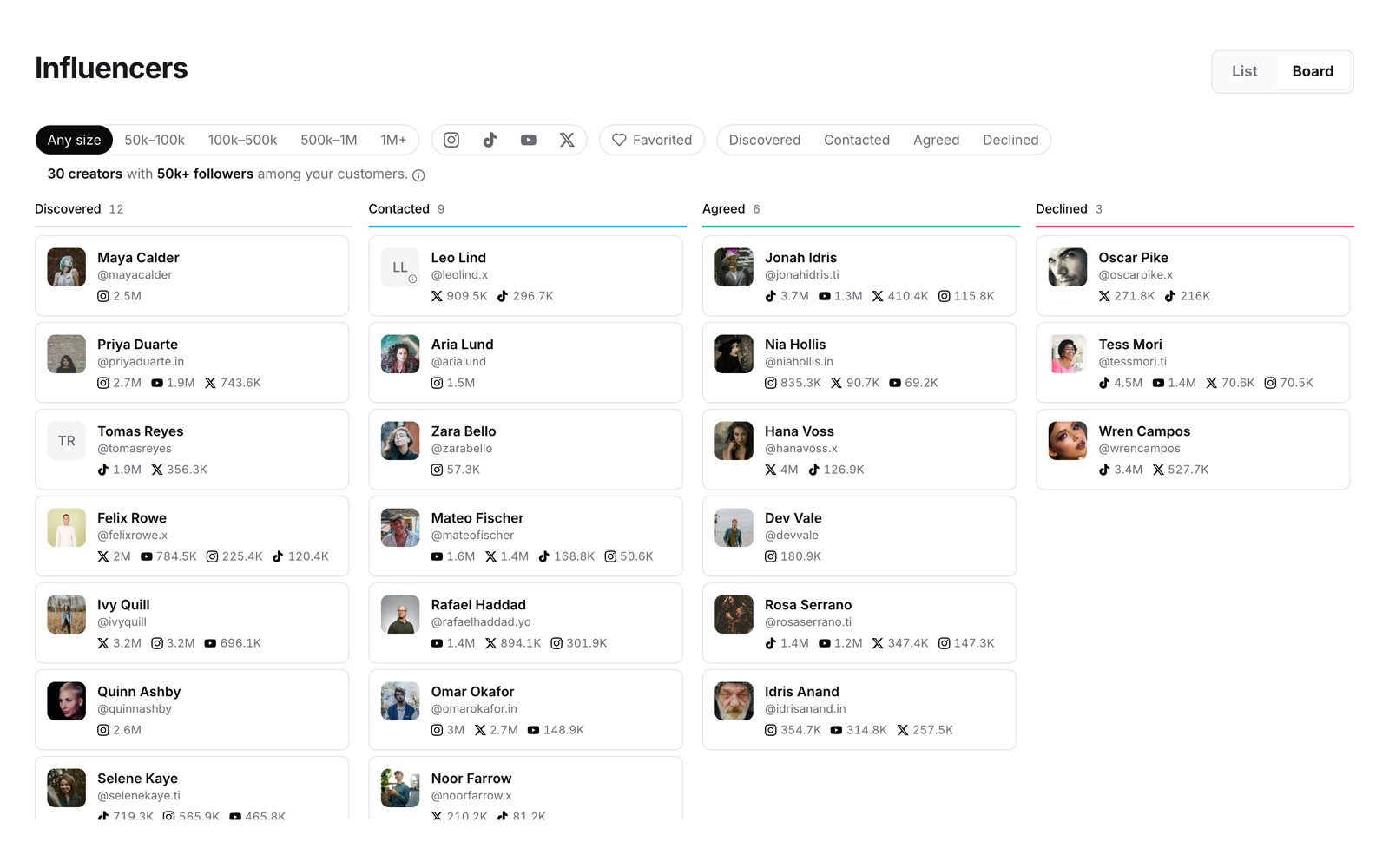
2. Pick List or Board. List shows a full card for each creator. Board shows creators in one column per status.
3. Filter by audience size. Pick Any size, 50k to 100k, 100k to 500k, 500k to 1M, or 1M+.
4. Filter by platform. Pick Instagram, TikTok, YouTube, or X. When you pick more than one, the list shows creators on any of the platforms you picked.
5. Show your favorites. Pick Favorited to see only the creators you favorited.
Track influencer outreach from Discovered to Agreed
Every creator on Influencers Board has one of four statuses: Discovered, Contacted, Agreed, or Declined. Set the status as your team works through the list. The Board shows one column per status, so your team sees who has been contacted and who has agreed.
Before anyone reaches out, check the creator's handles and content on their card to confirm it is the right person. Then contact the creator the way your team does today. Messaging creators from OuterSignal is coming soon.
Add a note to a creator to keep details with them. Notes hold text.
Ways teams work with creators who already buy from them
Teams use Influencers Board for the creator work they already do.
- Affiliate programs
- An affiliates team sees every creator among its buyers and who has reached out to each one, without watching a Slack channel for emoji reactions.
- Creator communities
- A brand that invites high-follower customers into a creator or affiliate community starts from its buyers with 50,000+ followers.
- Creator content
- A brand that wants content from people who already buy its products sees which buyers have a following and what they ordered.
- Gifting
- A brand that sends product to creators records each creator's outreach status on Influencers Board, next to the orders and spend OuterSignal already shows.
Influencers Board and the Signal Feed influencer filter
Influencers Board starts at 50,000 followers and lists buyers only. To find customers with fewer followers, use the influencer filter in the Signal Feed, which takes any follower count. Spotting Influencers in Your Customer Base shows how.
Use the Signal Feed filter when you want to set the follower count yourself, and Influencers Board to track outreach to buyers with 50,000+ followers.
For a longer guide to finding and working with the creators in your customer data, see How to Find Influencers Already in Your Customer Base.
Influencers Board is on every OuterSignal plan
Every OuterSignal account has Influencers Board, on every plan, free included, at no extra charge.
Questions about finding influencers among your customers
Who shows up on Influencers Board?
Customers who have ordered from you and have 50,000+ followers on Instagram, TikTok, YouTube, or X. People who have not bought from you do not appear.
Which platforms does Influencers Board cover?
Instagram, TikTok, YouTube, and X. Each card shows the creator's followers on each of those platforms.
Can I find creators with fewer than 50,000 followers?
Yes, with the influencer filter in the Signal Feed, which takes any follower count. Spotting Influencers in Your Customer Base shows how. Influencers Board itself starts at 50,000.
Can I message creators from OuterSignal?
Coming soon. Today your team contacts creators outside OuterSignal and records where each one stands on Influencers Board.
Can I fix a creator who is matched to the wrong person?
You cannot correct a match yourself. Contact OuterSignal support, and they escalate it. Check the handles and content on each card before you reach out.
Do I need to set anything up?
No. Click Influencers in the left menu.
What does Influencers Board cost?
It is included on every OuterSignal plan, free included, at no extra charge.
